Architecture
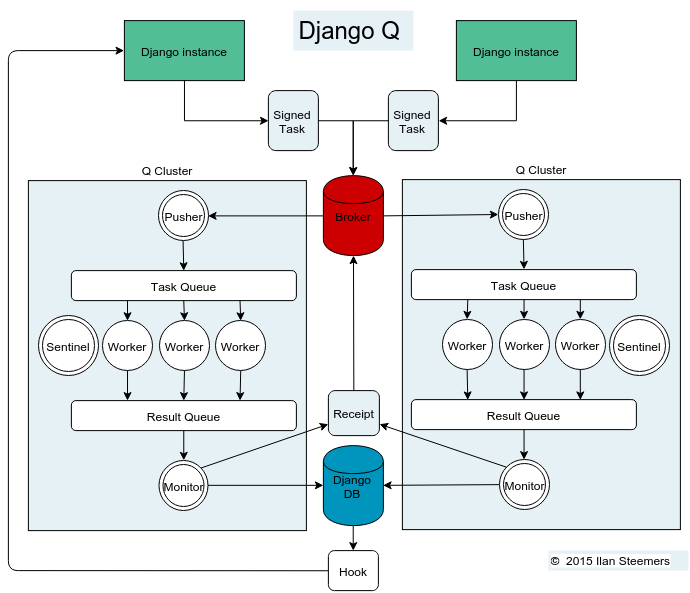
Signed Tasks
Tasks are first pickled and then signed using Django's own django.core.signing module using the SECRET_KEY and cluster name as salt, before being sent to a message broker. This ensures that task
packages on the broker can only be executed and read by clusters
and django servers who share the same secret key and cluster name.
If a package fails to unpack, it will be marked failed with the broker and discarded.
Optionally the packages can be compressed before transport.
Broker
The broker collects task packages from the django instances and queues them for pick up by a cluster. If the broker supports message receipts, it will keep a copy of the tasks around until a cluster acknowledges the processing of the task. Otherwise it is put back in the queue after a timeout period. This ensure at-least-once delivery. Most failed deliveries will be the result of a worker or the cluster crashing before the task was saved.
Note
When the ack_failures option is set to False (the default), a task is
considered a failed delivery when it raises an Exception. Set
this option to True to acknowledge failed tasks as successful.
Pusher
The pusher process continuously checks the broker for new task packages. It checks the signing and unpacks the task to the internal Task Queue. The amount of tasks in the Task Queue can be configured to control memory usage and minimize data loss in case of a failure.
Worker
A worker process pulls a task of the Task Queue and it sets a shared countdown timer with sentinel indicating it is about to start work. The worker then tries to execute the task and afterwards the timer is reset and any results (including errors) are saved to the package. Irrespective of the failure or success of any of these steps, the package is then pushed onto the Result Queue.
Monitor
The result monitor checks the Result Queue for processed packages and saves both failed and successful packages to the Django database or cache backend. If the broker supports it, a delivery receipt is sent. In case the task was part of a chain, the next task is queued.
Sentinel
The sentinel spawns all process and then checks the health of all workers, including the pusher and the monitor. This includes checking timers on each worker for timeouts. In case of a sudden death or timeout, it will reincarnate the failing processes. See abnormal deaths for the deaths it can not recover from. When a stop signal is received, the sentinel will halt the pusher and instruct the workers and monitor to finish the remaining items. See stop_procedure
Timeouts
Before each task execution the worker sets a countdown timer on the sentinel and resets it again after execution. Meanwhile the sentinel checks if the timers don't reach zero, in which case it will terminate the worker and reincarnate a new one.
Abnormal deaths
The task queue and the result queue are pipes shared by several processes, each guarded by a lock. A worker waiting for a task holds the read lock of the task queue, and the monitor waiting for a result holds the read lock of the result queue. A process that writes to a queue holds its write lock while the bytes go out.
A process that is killed by a signal never releases the lock it holds. When that happens the sentinel sees the death and spawns a replacement, but the replacement waits on that lock forever:
- After a worker is killed while it waits for a task, no worker ever receives a task again.
- After the monitor is killed while it waits for a result, results are never saved or acknowledged. Brokers with delivery receipts then hand the same tasks out again and again.
- After a process is killed in the middle of a write, nothing else can be written to that queue.
In all three cases the sentinel is still alive and keeps saving the cluster status, so nothing tells the cluster apart from a healthy one. The stop procedure hangs too, because it waits for the workers to read their poison pills.
With exit_on_abnormal_death the stop procedure looks for such a death as well and ends the cluster instead of waiting.
A death is harmless when the process held no queue lock. This is the case for a worker killed in the middle of a task, and for any process that ends through a Python exception or a regular exit. The sentinel can not tell which locks a dead process held, so it treats these deaths alike:
- A worker died abnormally when it is gone for any reason other than a timeout or a recycle that ended with exit code
0. - The pusher or the monitor died abnormally when it ended with a non-zero exit code.
By default the sentinel reincarnates the process and logs a CRITICAL line with its exit code and signal.
With exit_on_abnormal_death it stops the whole cluster with a non-zero exit code instead, so a supervisor can restart it on fresh queues.
Warning
Without exit_on_abnormal_death, a cluster whose queue got locked this way processes nothing and does not stop on SIGTERM either. It has to be killed.
Each worker also shares a timer with the sentinel, guarded by its own lock. The worker holds that lock while it hands a result over, which includes the receivers of the post_execute_in_worker signal.
The sentinel never waits for it. A worker that died holding the lock is reincarnated like any other dead worker.
A living worker that stays in the same handover for more than handover_timeout seconds is stuck in a place its timeout does not cover. The sentinel logs a CRITICAL line and stops it.
The sentinel stops a worker itself in two cases: the timeout of its task ran out, or its handover took too long.
A worker stopped in the middle of writing a result would leave the result queue locked, so the sentinel first takes the write lock of that queue and holds it until the worker is gone. Stopped this way the death is harmless, and the worker is reincarnated as after any timeout.
If the write lock is not available within 2 seconds, something has been writing for that long, possibly this worker. The sentinel stops it anyway, logs a CRITICAL line and treats the death as abnormal.
Scheduler
Twice a minute the scheduler checks for any scheduled tasks that should be starting.
- Creates a task from the schedule
- Subtracts 1 from
django_q.Schedule.repeats - Sets the next run time if there are repeats left or if it has a negative value.
Stop procedure
When a stop signal is received, the sentinel exits the guard loop and instructs the pusher to stop pushing. Once this is confirmed, the sentinel pushes poison pills onto the task queue and will wait for all the workers to exit. This ensures that the task queue is emptied before the workers exit. Afterwards the sentinel waits for the monitor to empty the result queue and the stop procedure is complete.
- Send stop event to pusher
- Wait for pusher to exit
- Put poison pills in the Task Queue
- Wait for all the workers to clear the queue and stop
- Put a poison pill on the Result Queue
- Wait for monitor to process remaining results and exit
- Signal that we have stopped
Warning
If you force the cluster to terminate before the stop procedure has completed, you can lose tasks or results still being held in memory. You can manage the amount of tasks in a clusters memory by setting the queue_limit.